
Guides
 What is MixMaster?
  Interface and Shortcuts
  Meet the Heroes
  What are Hench/Cores?
  Skills
  Hench Skills
  About Guilds
  Change Guild Image
  About the Castle War!
  What are Premium Zones?
  What is Synergy?
  About mix items
  How to Top Up Your Account?
  How to Redeem Items from NPC MailMan?
  Empty Message on Windows 10/11
 Guides
Problems viewing texts in the game
Some players report that they cannot see text inside the game.
This issue is common on laptops with two graphics drivers installed.
To fix it, follow these steps:
1. Open Device Manager.
"This PC" / "Computer" → "Properties" → "Device Manager"
2. Open Display adapters.
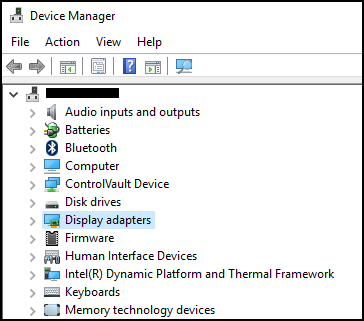
In most cases you will see two drivers: an onboard GPU and a dedicated GPU (for example NVIDIA GeForce). Disable the onboard driver and leave only the dedicated GPU active.
Try launching the game again.
Another option that often works:
1. Open the NVIDIA Control Panel (or your GPU control panel) and change the display/graphics mode from "Auto" to your dedicated video card.
You can also fix the problem by updating or reinstalling the official drivers for your Intel graphics.
Download the automatic installer; it detects the latest driver for your card and updates it.
Official Intel tool:
Intel® Driver & Support Assistant
This issue is common on laptops with two graphics drivers installed.
To fix it, follow these steps:
1. Open Device Manager.
"This PC" / "Computer" → "Properties" → "Device Manager"
2. Open Display adapters.
In most cases you will see two drivers: an onboard GPU and a dedicated GPU (for example NVIDIA GeForce). Disable the onboard driver and leave only the dedicated GPU active.
Try launching the game again.
Another option that often works:
1. Open the NVIDIA Control Panel (or your GPU control panel) and change the display/graphics mode from "Auto" to your dedicated video card.
You can also fix the problem by updating or reinstalling the official drivers for your Intel graphics.
Download the automatic installer; it detects the latest driver for your card and updates it.
Official Intel tool:
Intel® Driver & Support Assistant